What Is I Cloud

iCloud is network-based Web Operating System and collaborative environment designed to be intuitive, easy to use and fast to learn..

I Cloud

iCloud employs the latest RIA (Rich Internet Applications) technologies like JQuery, AJAX, GWT, JSON etc to deliver its rich and highly intuitive interface.

Now In Cloud World

Being able to work from everywhere, regardless of whether or not you are using a full-featured, modern computer, a mobile gadget, or a completely obsolete PC.

Sharing resources

Sharing resources easily between different work centers at company, or working from different places and countries on the same projects.

privilege of personalizing

In Today's world, every person enjoys the privilege of personalizing almost everything around him. With the advent of the Internet and technology all that is capable of us to personalize our own Desktop and Laptops.

Showing posts with label Blogging Tips. Show all posts

Monday, 30 April 2012

Blogger Vs Wordpress [Infographic]

There are lots of blogging platforms available these days. But the most popular are Wordpress and the Blogger or Blogspot. Fans of them support their favorite blogging platform but which blogging platform is better ? Well, this question is circulating since a long time and everyone is having their own views. Both of them are having their own different features which scores over on each other.

I just found this infographic comparison between WordPress and Blogger. I believe that you will find this helpful. I believe you would add some comments at the end of this post. That would help me know what you have learned and what you want to add to this

bloggervswordpress"


Blogger Advantages:
  • The Blogger platform requires less investment to create a blog and hence is good for initial bloggers who don’t want to spend more in starting a blog.
  • If you have good CSS and XHTML skill that you want to flaunt in your blog, then Blogger is the right platform for you.
  • Money is not required . Free Service
Blogger Disadvantages :
  • You don’t want to have number of authors for the blog(as there is no “Submit for Review option)and you want to be the whole and soul of the blog, then Blogger is the platform for you.
  • You have add Alt Tags to Images to have a better SEO .
WordPress Advantage :
  • If you want your blog to have a professional look and you don’t have enough knowledge of CSS or HTML, then to choose WordPress as your blog platform is the best option.
  • Good SEO with least effort is the way you wanna go, then WordPress is the platform for you.
WordPress Disadvantage :
  • Money is required a lot to buy Hosting . For free Service you can try WordPress.com which has less features . (No Plugins) .

What Do you Say About this ?

Blogger or WordPress ?
Saturday, 28 April 2012

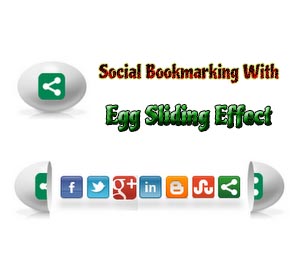
Social Bookmarking Gadget With Egg Sliding Effect


social sharing

In my previous posts i have shared a lot of beautiful social sharing widgets like 4 in 1 social widget slider, floating social sharer and much more. However it is clear that each and every blog should have an social sharing widget in order to gain attention of huge number of new unique visitors from social networks. Then do you wont feel like the look and feature of various social widgets really matters in order to make your blog visitors feel like sharing your blog content?!!. The look of social widgets on your blog really matters a lot in getting your visitors to share your content on social networks. In today's post, I am giving a most beautiful social bookmarking gadget for your blogger blog with egg sliding effect on mouse hover. Then what are you waiting for!!, lets move with the tutorial.


Tutorial On Adding Social Bookmarking Gadget With Egg Sliding Effect::
1. Go to Blogger dashboard --> Template --> Edit Html (Tick Expand widget template).
2. Find(Ctrl+F) </head> and paste the following code just above it.
<script src='http://w.sharethis.com/gallery/shareegg/shareegg.js' type='text/javascript'/><script src='http://w.sharethis.com/button/buttons.js' type='text/javascript'/><script type='text/javascript'>stLight.options({publisher: &quot;bea50586-2b9f-448d-947a-01385f28e305&quot;, onhover:false}); </script><link href='http://w.sharethis.com/gallery/shareegg/shareegg.css' media='screen' rel='stylesheet' type='text/css'/>
3. Now find for </body> and place the following code just above it.
<div style='position: fixed; bottom: 2%; left: 2%;'><div class='shareEgg' id='shareThisShareEgg'/></div><script type='text/javascript'>stlib.shareEgg.createEgg(&#39;shareThisShareEgg&#39;, [&#39;facebook&#39;,&#39;twitter&#39;,&#39;googleplus&#39;,&#39;linkedin&#39;,&#39;blogger&#39;,&#39;stumbleupon&#39;,&#39;sharethis&#39;],{title:&#39;<data:blog.pageTitle/>&#39;,url:&#39;<data:blog.url/>&#39;,theme:&#39;shareegg&#39;});</script>
4. Save your Template.

 
Blogger Widgets