What Is I Cloud

iCloud is network-based Web Operating System and collaborative environment designed to be intuitive, easy to use and fast to learn..

I Cloud

iCloud employs the latest RIA (Rich Internet Applications) technologies like JQuery, AJAX, GWT, JSON etc to deliver its rich and highly intuitive interface.

Now In Cloud World

Being able to work from everywhere, regardless of whether or not you are using a full-featured, modern computer, a mobile gadget, or a completely obsolete PC.

Sharing resources

Sharing resources easily between different work centers at company, or working from different places and countries on the same projects.

privilege of personalizing

In Today's world, every person enjoys the privilege of personalizing almost everything around him. With the advent of the Internet and technology all that is capable of us to personalize our own Desktop and Laptops.

Showing posts with label facebook. Show all posts

Sunday, 6 May 2012

Facebook IPO: A bet on 'King' Zuck

Mark Zuckerberg will wield near total control over Facebook's future. Some fear that once the hype dies down, the situation could lead to problems no one will be able to do anything about.

Mark Zuckerberg, shown here in 2010.


When Facebook executives and its bankers hit the road Monday to pitch the company's public offering to money managers, two questions will surely face prospective investors: Should we worry about the slowdown in the business? And what's up with Zuck calling the shots on, well, everything?
The answer to the first question is yes. Facebook does state in its IPO filing that "rates of user and revenue growth will decline over time." And while the company still has unprecedented reach -- an astounding 526 million active daily users -- that's a troubling harbinger given how Facebook has boosted revenue over the years by adding more users to its service.

But what Facebook will do to make more money off that already giant audience leads to the second question, which is a lot harder to answer: Can Mark Zuckerberg can keep coming up with the right answers?
That's because Zuckerberg exerts unusual control over Facebook because of his stock ownership. After the Facebook IPO, Zuckerberg will own 18.4 percent of the stock and control more than 57.3 percent of the voting power, a degree of influence that Facebook alludes to in the risk section of the S-1 document:

As a result, Mr. Zuckerberg has the ability to control the outcome of matters submitted to our stockholders for approval, including the election of directors and any merger, consolidation, or sale of all or substantially all of our assets.
The dual-class tactic has long rankled shareholder advocates because it's used as a power grab, which is counter to the notion of a public company. Larry Page admitted as much in Google's S-1 from April 2004 when he wrote about the control he and co-founder Sergey Brin were giving themselves: "By investing in Google, you are placing an unusual long-term bet on the team, especially Sergey and me."
While Google started what's become a popular structure among tech companies going public -- LinkedIn, Zynga, and Groupon all took this route -- the issue goes farther back. In 1956, Ford Motor successfully lobbied the New York Stock Exchange so that it could go public with a dual class of stock despite the NYSE's one-share, one-vote rule at the time, said Charles Elson, the director of the John L. Weinberg Center for Corporate Governance at the University of Delaware. As a result, Henry Ford and his family maintained control after what was then the single largest IPO in Wall Street history.
Media companies, too, have long used dual-class stock structures, from The New York Times to CNET's parent, CBS, at which Sumner Redstone has almost 80 percent voting control. For a public tech company, giving so much power to single individual is unprecedented.
This isn't generally a problem, until problems arise. Look at the stronghold Rupert Murdoch -- with nearly 40 percent control over News Corp. -- maintains over his embattled enterprise. "Investors have no opportunity to take action," said Elson.
Big mutual managers surely will wonder why they ought to put millions of dollars into a company that, with a potential $96 billion valuation, looks crazy by standard Wall Street metrics, such as price-to-earnings ratios. Zuckerberg has so much control over the company -- he designed it that way -- that a bet on Facebook is largely a bet on the talents of the almost-28-year-old tech wunderkind.
"You're betting on a king, on an old-style king," said Elson. "And if the king turns out to be not such a good ruler, you're stuck."
As a cautionary tale for potential Facebook investors, Elson points to Yahoo, which has seen plenty of CEO turnover owing to pressure from shareholders angry at the mess the business is in. Yahoo's current CEO, Scott Thompson, is now under attack by hedge fund Third Point. And last September the board ousted its last CEO, Carol Bartz, in a shakeup that couldn't happen at Facebook no matter how badly Zuckerberg stumbles.
"A board has two jobs," a person who's served on the boards of several public Silicon Valley companies told me, "acting as a sounding board, and hiring and firing the CEO. If the CEO wants to go ahead with something the board doesn't like, the only power they have is to fire him. And in Facebook's case, they can't even fire him."

Zuckerberg has already shown his desire to go it alone when it comes to big decisions. When he bought Instagram for $1 billion in cash and stock, he reportedly didn't even tell his board until the deal was all but done. Maybe board members questioned the price tag, as so many outsiders did after the deal was announced, but maybe they didn't. It probably wouldn't have mattered.
Of course, it'll be in Zuckerberg's interest for the stock to do well. For one, it'll keep his employees from jumping ship. It'll also provide him with a powerful currency with which to do more Instagram-like deals, and perhaps ones far larger.
And a bunch of outcry from finance profs is unlikely to dampen demand for this offer. This is Facebook, after all. Everyone knows it. Everyone wants a piece. And, despite the slowdown in the first quarter, this is still a profitable company on track to generate more than $4 billion in revenue this year. And though the king is just 27, so far he hasn't messed up.
It's also easy to argue Facebook's enormous potential, and that's what the bankers and Facebook executives will naturally stress during the upcoming road show, which is set to culminate with the IPO on May 18. Facebook already has frustrated advertisers eager to give it more money, and there's plenty of speculation that Facebook will become a place for e-commerce transactions, as its acquisition in April of a startup called TagTile suggests. And there's much more.
With such promise, fund managers won't want to be left out, even though money managers often shy away from IPOs with dual-class stocks. Retail investors also will likely jump in as soon as the shares start trading, even if they can't yet separate the price from the hype and all the pundits warn them to sit tight.
"This is one of those times when people act contrary to their own interest," Elson said. "The hype overwhelms good judgement."
Perhaps. But that good judgement also would have kept people out of Google, which since going public at $85 a share in August 2004 has climbed 617 percent. And Facebook seems a lot more Google than it does Groupon.

Monday, 30 April 2012

Facebook Rolls Out Apps For Timeline To Give Your Profile A More Personal Feel [News]

As with any change Facebook makes, Timeline was greeted with mixed reviews. Some users adore it (myself included) while others wish things would go back to the way they were. Love it or hate it, Timeline is here to stay, and Facebook is taking things a step further to enhance the experience by allowing third-party developers to create apps that use Timeline to share even more. Just reading the comments on the Facebook blog show how mixed peoples feelings are on the subject.


At launch, Facebook has apps available for all kinds of interests. They have apps for travelers, movie watchers, foodies and many more. Of course, these are just the launch apps and Facebook plans to add many more as time goes on. Chances are, if there is something you enjoy, Facebook will have a Timeline app that can handle it.
Adding an app is as simple as visiting the Timeline apps page and adding it to your profile. Your friends will see your activity from the app in their news ticker, on your profile and possibly in their news feed. It makes it easy to share whatever hobbies you enjoy.


Popular services such as Rhapsody, Spotify, GoGoBot and LivingSocial are available. Check out the Timeline apps page for a complete listing of apps.
Let us know in the comments which apps you enjoy, or how you feel about Timeline. Do you think Facebook is going too far with all these extras? We would love to hear your opinion!

Facebook to Introduce ‘Lifesaving’ Feature Tuesday

Facebook CEO Mark Zuckerberg is scheduled to appear on ABC’s Good Morning America on Tuesday to introduce a feature that “could save lives.”
The program teased the segment by noting that Zuckerberg “doesn’t do much TV” and then asked, “So why is he inviting [GMA news anchor] Robin Roberts to Facebook’s headquarters? What does he want to share that could save lives?”
Facebook reps could not be reached for comment on the announcement. The social networking giant has introduced tools of late that could be described along the same lines. In December, Facebook launched a program called “Lifeline” that let friends alert the company when their friends express suicidal thoughts. In that case, Facebook sends an email to the comment’s author directing them to a telephone hotline or a link they can click to start a confidential chat.

The company also introduced a suite of tools last March aimed a cracking down on cyberbullying.
In addition to Zuckerberg’s appearance, Facebook COO Sheryl Sandberg is also scheduled to appear on GMA for an interview with Diane Sawyer to “discuss the personal stories that led to this new initiative and its goals,” according to ABC.
What do you think Facebook is going to introduce? Let us know in the comments.

INFOGRAPHIC : Google Versus Facebook On Privacy & Security

It’s the classic ongoing battle which has been raging relentlessly without a ceasefire since the birth of social networking – how much privacy and security (if any) do you actually have on these sites? And who wins in these areas (if anyone)?  The two top dogs currently slugging it out for the number one spot are Google and Facebook. Each both have things going for them and things going against them.
For example, Google kicks the pants off Facebook when it comes to working capital and monthly unique users.  But the search engine giant falls down completely in the areas of banning the use of pseudonyms and blocking individuals from seeing a post.  Both sites are also the subject of a huge number of cyberattacks, which will put your data at risk when someone finally succeeds at breaking through.  So who has the best firewalls and site security?
It’s difficult to tell for sure who trumps who in the privacy and security battles, which is why this handy infographic from Veracode sums things up nicely for you to make your own mind up.  Let us know what you think.  Who would you trust more with your private information?  Google or Facebook?  Or neither?  Do you think either network is improving in these areas or getting worse?
Click on the infographic to be taken to a larger version


google facebook privacy security

DOWNLOAD Learn LinkedIn: How To Build Your Living Resume

Learn the true power of LinkedIn. Whether you’re looking for a job or looking to hire new talent, LinkedIn is a resource you can’t afford to miss. If you feel lost when you use this social network it’s time to download “Learn LinkedIn: How To Build Your Living Resume“. Written by author Joshua Sherman, this guide will teach you not only how to use LinkedIn but also how to get the most out of it. It’s all about building a living, online resume.
Many don’t realize how effective LinkedIn can be as a source of information, resources, or even future opportunities. Unlike other social media sites, which let you see reposts of Reddit from your friends or get the latest and greatest updates regarding how Mary-Ann checked in at Starbucks, LinkedIn instead focuses on your professional world, allowing you to build a network of professionals and enjoy the countless perks that can come with that.
In this manual, we’ll show you how to set yourself up on LinkedIn, establish your account, and develop your “living resume” in an easy step by step process. Those of you who have no clue about LinkedIn or how it works, fear not! We’ll go over must-know tips and information to ensure you don’t make any mistakes. For those of you a little seasoned in the LinkedIniverse, feel free to read on – you will learn some new tricks, or how to better personalize or develop your living resume.

The guide is free but password-protected. Gain access to the password by:
1- subscribing to our newsletter (you may do this on the download page itself, link above). Existing subscribers will receive the guide via email in the next couple of hours.

OR

2 – Simply join our Facebook page. Quick and easy.
This amazing free manual will teach you:
  • What LinkedIn is, and why you should use it.
  • What a living resume is, and why LinkedIn works as one.
  • How to set up a LinkedIn account and find contacts.
  • What to add and not add to your LinkedIn profile.
  • Networking to turn third-degree contacts into firsts.
  • How to ask for a recommendation without being awkward.
  • Finding people you want to connect with.
The guide is free but password-protected. Gain access to the password by:
1- subscribing to our newsletter (you may do this on the download page itself, link above). Existing subscribers will receive the guide via email in the next couple of hours.
OR
2 – Simply join our Facebook page. Quick and easy.

Facebook Launches Facebook Security, Offering Free Anti-Virus Software & Expanded URL Blacklist [Updates]

Facebook has launched a new security initiative, aimed to further protect Facebook users from malware, phishing scams and viruses. Along with renowned security companies such as Sophos, Symantec, McAfee, Trend Micro and Microsoft, Facebook is now offering an expanded URL blacklist system, and free software downloads from these five companies.
The gateway to this new project is the Facebook Security page, where users can read security-related updates and access the Security Homepage and the Anti-Virus Marketplace. The updates are on the security page, which Facebook also refers to as a blog, and you will also find security updates from Sophos, Symantec et al., which you can the share with your friends.
On the Anti-Virus Marketplace, you will find free downloads for anti-virus software from all these companies. Aside from Microsoft, which offers its product for free as it is, you can access 6-months licenses for any of the remaining software, without paying a dime. Facebook’s URL blacklist will now also incorporate the databases from these companies. This is Facebook’s attempt to get people more aware of security threats, and to help them feel more secure when browsing Facebook.

Through the security homepage you can also access a PDF of the Facebook Security Guide, and other security-related tips. As of this minute, many of the options on this page are not working, either returning an error or claiming users are not authorized to use this option. Although this will probably be fixed soon, this security initiative is still worth checking out if you’d like to try any of the aforementioned anti-virus software for free, and get some security tips from the leading companies in this field.

Facebook App Fosters Community for Breast Cancer Patients

A new Facebook app, Circle of Support, provides a rare support community for people living with metastatic breast cancer (MBC).
This secure Facebook community allows people suffering from MBC to share their struggles and receive support from their friends and family. Recent research by Genentech, the company that created the app, shows many MBC patients feel their needs are not met and others around them do not understand what they are experiencing.

“The Facebook app was designed as a part of this overarching program to provide additional support for people with MBC,” Susan Willson, a spokeswoman for Genentech told Mashable. “As a company, we felt there was more we could be doing outside of the lab to support people with the disease. We wanted to match the innovation inside the lab with innovation outside of the lab.”
With the new Facebook app, an individual living with MBC can select Facebook friends who they would like to invite to join their support network. The patient can chose suggested support activity ideas — such as weekly phone calls, movie outings, prepared meals or going for a manicure — that friends and family can see they are seeking and subsequently provide.


MBC, an advanced form of the disease with no cure, means the cancer has spread from the breasts to other parts of the body. Patients with MBC often do not relate to the movement behind the Pink Ribbon and Breast Cancer Awareness Month, because they have no shot at survival. More than 155,000 people in the U.S. are living with the aggressive cancer.
“It was an area that really needed a light shined on it,” Willson says. “The great survivor stories come from women living with a different experience.”


Genentech’s embrace of Facebook is unusual among pharmaceutical companies. Johnson & Johnson and AstraZeneca shut down their Facebook pages last year, when Facebook began requiring pharma brands to allow open comments. Others, such as Janssen UK’s Psoriasis 360 page, have shut down because they require too much maintenance.
Do you think Circles of Support taps an unmet need for patients with MBC?

Why CEOs Should Allow Facebook in the Workplace [INFOGRAPHIC]

Many CEOs forbid use of social media at work, but recent research shows that web surfing leads to increased productivity.
This Keas infographic explores the benefits of social media in the workplace, showing that social connections make people happier and a brief recess involving Internet-browsing increases productivity.
An Academy of Management experiment gave three groups of people — a control group bundling sticks, a group taking an Internet-free break and a group browsing the Internet for 10 minutes — the simple task of highlighting as many letter A’s as they could among 2,000 words of text.
The three groups then had their mental exhaustion measured. Those browsing the Internet were 16% more productive than the Internet-free break group and 39% more productive than the control group.


The study concludes that taking a break, particularly one spent browsing the Internet, should be encouraged by employers hoping to increase productivity.
Do you use Facebook at work? Does it negatively or positively affect your concentration? Sound off in the comments.

Saturday, 28 April 2012

Facebook Vs Google Plus [INFOGRAPHIC]

Hello Friends ! so now Iam posting some Cool infographics on Facebook and google plus.i think if you're a Social networking user.then u are Aware of The battle Betweent the Two biggest social networking sites namely Facebook and Google Plus.so Here is an Info graphic showing how Google plus from facebook and vice versa.
You know what there are 100 million users for google plus and 845 million users for Facebook.Where as google consists of 71 % men more than Facebook (43 %)


So  Here is the Infographic :.


10 Reasons Blogging is Better than Facebook [INFOGRAPHIC]

Well facebook is a biggest social networking site.many people use facebook to promote their blogs or sites and the content in it to get more traffic.but still there are some Drawbacks.iam a Huge Facebook fan. but if you're not blogging then you're missing some important benifits! in addition trying to build popularity on third party services is always not good.
So here are some 10 reasons why blogging is better than Facebook :.


So which one is better for you, Facebook or Blogging ? Give your valuable comment below.

If you like my post.please do share it to Social Networking sites.thanks for visiting !

Scan Your Facebook Wall with Norton

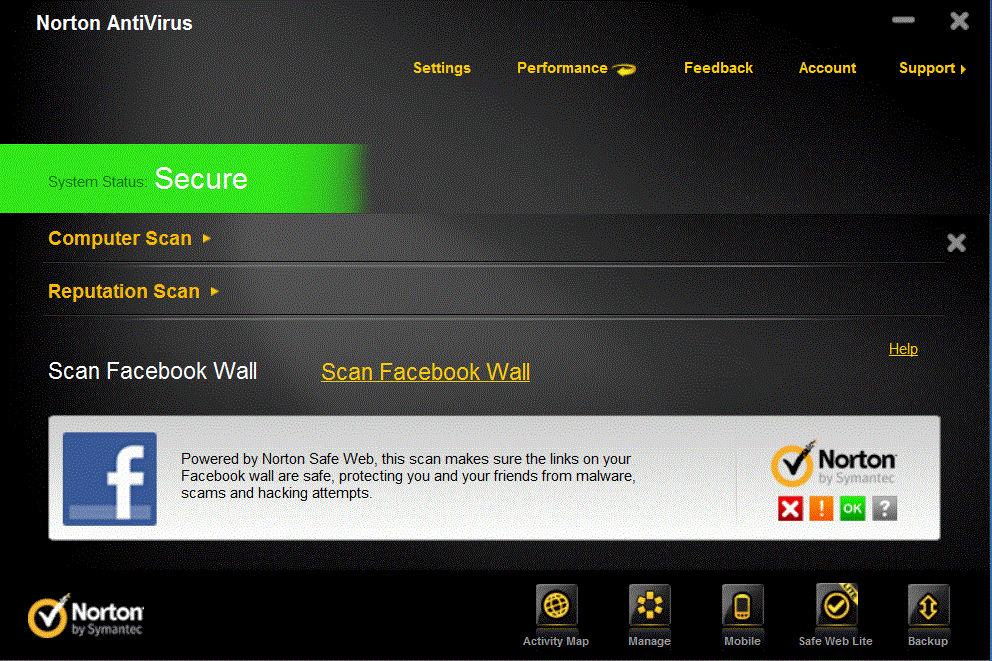
Hello Guys.isn't it Interesting if Any software Scans your Facebook Wall and Make your Account Safe,protecting From the Malwares and Anything Else Over the Internet.Yeah it is quite interesting,Here is the protection for your Facebook Wall and Your Account made easy just simple As it is.Install the Norton Internet Security on your Pc And finish all the Requirements I mean updates ,Activation and Scanning.etc  


Now you are Ready for the action,just open your Norton internet Security and follow the Steps.


Now Click on the Banner which contains the Facebook logo or click on the Scan Facebook Wall link.
Now it will redirect you to Facebook Application page.Just Login to your Account and Confirm the Request.
Now Activate Norton Auto Scan


So now You've to Enable Auto Scan .there will be a button on the top Right Corner Just click it to enable Auto scan.


Here is the Link to Norton Scan App  -- Click Here 


Click Here to Go to the App --- Click Here


So now "All is Well ".Everything is Set ready and Norton Automatically Scans your Facebook wall .So Enjoy Social Networking in a Secure Way.isn't it Interesting.if you like this post.Please Share this to Facebook.

Update Facebook Status Via Any Device

Well this post is About Facebook Status Trick Which Is Really Awesome.You Might Have Heard or Seen some fake Facebook updates and shares via I Phone, Blackberry, I pad etc.Well How To post Via iPhone.in Facebook Status..bcoz some cannot afford to buy an iPhone For Facebook Status update..So To impress others This Trick May work fine.


So you can see how I posted through different via sources Below  you can also do this with a very easy process just follow Below Steps :-

Go to Facebook.com and sign in
 
Now copy the below code and paste it in the address bar .: 

http://www.facebook.com/connect/prompt_feed.php?preview=true&api_key=112930718741625


Now Change the Last Digits I mean the code ie Numbered part with the appropriate device u like below and replace the code with it

Skynet (249284985083592)
iPhone (6628568379)
Blackberry (2254487659)
Palm (7081486362)
Sidekick (21810043296)
Sony Ericsson (38125372145)
Xbox LIVE (5747726667)
iPad (112930718741625)
Foursquare (86734274142)
Telegram (140881489259157)
Carrier Pigeon (130263630347328)
Morse Code (134929696530963)
Message in a Bottle (123903037653697)
Commodore 64 (138114659547999)
Your moms computer (132386310127809)
TRS-80 (134998549862981)
K.I.T.T. (129904140378622)
Mind Computer Interface (121111184600360)
eyePhone (110455835670222)
toaster (203192803063920)
microwave (0a5266c8844a1b09211e7eb38242ac2f)
Super Nintendo Entertainment System (235703126457431)
Gameboy Color (180700501993189)
GoD (256591344357588)
Glade Air Freshner (4aeb4db2e8df1cdb7f952b2269afb560)
Strawberry (a4c9fb1708a848c2241674531176209b)
The moon (221826277855257)
Dr. Pepper (eea90d40e1d12565695dbbbdbd5e965b)
Nintendo wii (243870508973644)
Alcohol (250335888312118)
Cheese (218791271497130)
iPod Nano (142039005875499)
Nintendo 64 (236264753062118)
Microsoft Excel (242740155751069)
Linux Ubuntu (220593361311050)
iPhone 5g (211333348912523)
My Bedroom (174811032586879)

Your Mums Bedroom (5f64bbc9ac2f12b983200925da461322)
Lamp (230755826955133)
Your moms anus (b625297b655f0b46c86b68f754b82121)
Refrigerator (250828364944350)
A potato (127926427295267)
Nasa Satellite (31d608d30292175bf7703149699ccb39)
Vibrator (eb4c6d1a60e19a7795da501e1f468035)
Sperm Whale (170318539700306)
Pogo Stick (185103391549701)
Banana Phone (1477a4cd29ec724a3de19be5d26e0389)
Google+ (4d8243dbb7064f88351fe6c809582320)
The Future (108372819220732)
Smoke Signal (134138923334682)
tin cans connected by string (242191299125647)
Pokedex (de3da265cf6976745bb1d60a8c198151)
Telepathy (ea01a57edb26cf1de143f09d45cfa913)
Typewriter (d3d554bf60297cb2c384e3d7cf5a066d)
Harry Potter (b8ebeb983f45eaa0bd5f4f66cad97654)
TARDIS (200439256674396)
Pip Boy (142806259133078)
Mind Control (1dc633368924b3b0b4d08e3f83230760)
Jedi Mind Control (240597869302110)
Telekinesis (224139600960217)
Post-It Note (115227201900831)
GLaDOS (246126362083515)
Ansible (185474028180003)
W.O.P.R (228373497202865)
Airwolf (123944137696757)
HMCS Belafonte (222345601140304)
Hogwarts (2dc1d3004dbc4a67c4b552be3c25ccb0)
So now click enter and you will get window which will ask you to enter the status Message and then click on share thats'it Over, Now u  check your status message and impress your friends with new via status Messages Trick.

Download Facebook Photo Album in a Single Click

Hai friends. Today I will tell you how to download Facebook Photo Album.
Well If you want to download all the photos of your friend  or any others album,then it becomes difficult to download each and every single photo manually.Here I am going to introduce a simple trick using which you can download all the photos of Facebook Album in a single click.


Follow Below Steps :.


1.Go to facebook2zip.com By clicking Here
2.Make sure that you are logged into your Facebook Account.
3.Click the Login button  with Facebook.

Now Choose One of your friends Album you want to download and click next.
Now choose the Photo Album which you want to download.and
Now your download will be ready and you can download the photo album by clicking on Download button to any desired location.

That's it friends. Though there are many applications to download facebook photo albums.but i think this is the easiest and fastest one.Hope that u liked this post.Stay connected with us

How to Post Animated Gif Pictures on Facebook Wall

Well facebook Does not allow to post animated gif images directly using photo uploading method but still there are some applications from which we can post these animated images on our friends wall.


Animated-Facebook is also such kind of service which enables us to post animated gif images on facebook wall.either using the default images on their database or using our own images which are hosted anywhere else. by just entering the url of the image.so to create animated gif images just follow the below Steps


How to post Animated-picture on Facebook wall :.


First Login to your Facebook Account. and then Visit the Animated-picture page.


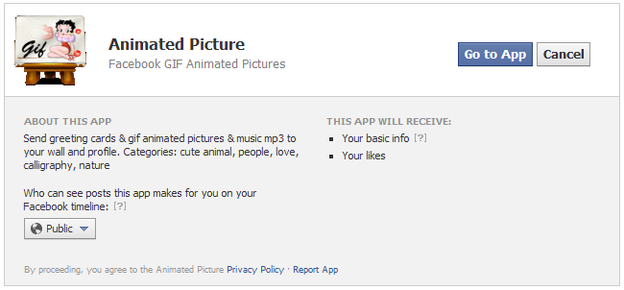
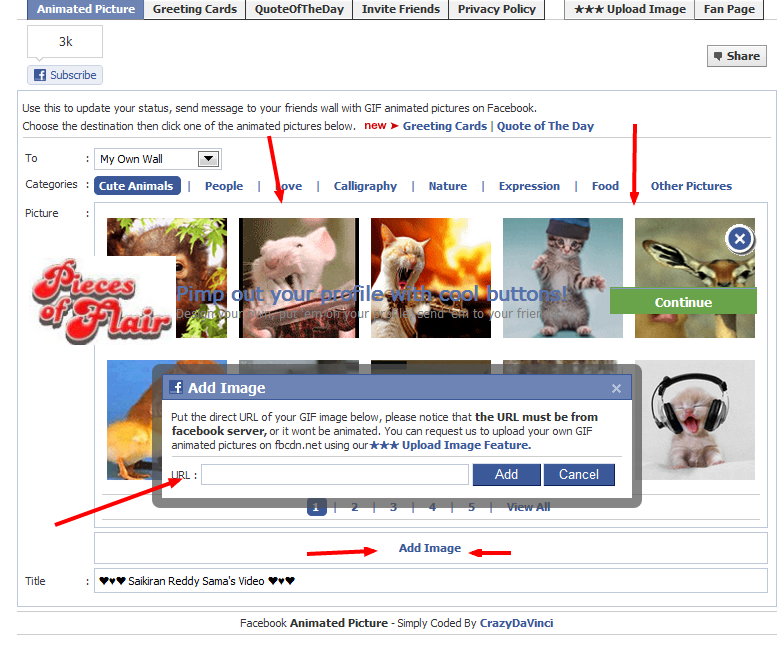
Now as you seen above Screenshot just click on the Go to App button so now you will be redirected to their interface.now either select the default images or you may select any other images hosted anywhere by using the image URL.


So now you've completed Choosing your image which you want to share. then Click on the Image And you will see a box like below.
 
 Now enter your Desired text in the text box and Click on Share .so that your animated gif is live on your Wall.well the drawback is that some images won't work here.. we have to click on such type of images for redirection.

Social Bookmarking Gadget With Egg Sliding Effect


social sharing

In my previous posts i have shared a lot of beautiful social sharing widgets like 4 in 1 social widget slider, floating social sharer and much more. However it is clear that each and every blog should have an social sharing widget in order to gain attention of huge number of new unique visitors from social networks. Then do you wont feel like the look and feature of various social widgets really matters in order to make your blog visitors feel like sharing your blog content?!!. The look of social widgets on your blog really matters a lot in getting your visitors to share your content on social networks. In today's post, I am giving a most beautiful social bookmarking gadget for your blogger blog with egg sliding effect on mouse hover. Then what are you waiting for!!, lets move with the tutorial.


Tutorial On Adding Social Bookmarking Gadget With Egg Sliding Effect::
1. Go to Blogger dashboard --> Template --> Edit Html (Tick Expand widget template).
2. Find(Ctrl+F) </head> and paste the following code just above it.
<script src='http://w.sharethis.com/gallery/shareegg/shareegg.js' type='text/javascript'/><script src='http://w.sharethis.com/button/buttons.js' type='text/javascript'/><script type='text/javascript'>stLight.options({publisher: &quot;bea50586-2b9f-448d-947a-01385f28e305&quot;, onhover:false}); </script><link href='http://w.sharethis.com/gallery/shareegg/shareegg.css' media='screen' rel='stylesheet' type='text/css'/>
3. Now find for </body> and place the following code just above it.
<div style='position: fixed; bottom: 2%; left: 2%;'><div class='shareEgg' id='shareThisShareEgg'/></div><script type='text/javascript'>stlib.shareEgg.createEgg(&#39;shareThisShareEgg&#39;, [&#39;facebook&#39;,&#39;twitter&#39;,&#39;googleplus&#39;,&#39;linkedin&#39;,&#39;blogger&#39;,&#39;stumbleupon&#39;,&#39;sharethis&#39;],{title:&#39;<data:blog.pageTitle/>&#39;,url:&#39;<data:blog.url/>&#39;,theme:&#39;shareegg&#39;});</script>
4. Save your Template.

The Facebook Phone Rumor Is Back


facebook-droid


Once upon a time Michael Arrington broke the news that Facebook was developing its own phone. That was in 2010. However in a followup interview with TechCrunch, Mark Zuckerberg killed the notion, saying they’re pursuing a horizontal strategy that will put a social layer on top of existing platforms. “We’re not trying to compete with Apple or the Droid or any other hardware manufacturer for that matter,” he said.
But now, two years later, that strategy may have changed.
A new report hit today stating that Facebook and HTC are co-developing a customized Android smartphone. This phone, said to be developed exclusively for Facebook, would integrate all of the social network’s functions into the mobile platform. Per unnamed industry sources, the device would launch at the earliest in the third quarter of 2012.


Download Facebook Template For Blogger|I Cloud|Tricks and Tips


Hello Friends. Today I Have a New theme to share with you all ! ie Facebook theme rather called Facebook Template.


So here iam Providing Two Templates Each one doesn't Compared together :.

Friday, 27 April 2012

How to Leverage your Social Media Presence as an Expert? [INFOGRAPHIC]

How to use social mediaAre you a student, housewife or a business professional? How do you use social networks to make the most? Which social network best suites your needs? Is it Facebook, Twitter, LinkedIn or Google Plus, or everything? Quite puzzling ! Let’s make it simple with the help of an infographic.
Zintro, the business consultant network, recently collected data from Facebook, Twitter, LinkedIn, Google+ and other 11 sites to sum-up and presents a research report in the form of an infographic. This will not only provides you some vital information about these social networking sites but also helps you to develop your online social media strategy efficiently.

Using Social Media to Find a Dream Job


You’re in the market for a new job, but if you’re also in the social media world you may be in the job-searching market even deeper than you realized. The web is the place to meet and connect not only with friends, but also future work associates.
Social media profiles are quickly replacing the traditional resume. Let’s take a look at four social media websites and how you can utilize these communities to launch your job search and further your career.

How to Use Facebook Timeline Movie Maker to Create Timeline Movie


You must be well aware of the Timeline profile that Facebook announced at the f8 developers meet last year. If you aren’t, the Facebook Timeline is basically a beautiful and colorful representation of your life and time spent on Facebook. During the launch, Facebook enticed the crowd with a Facebook Timeline movie made of a certain users profile. However, not many were stoked with the idea of having their whole life, i.e, photos, status updates, friendships, wall post, videos and everything else posted on a single page and open to all your friends.
And many are going to be furious once they will be forced to change to the new Timeline profile and let go of the old look. Yes, Facebook is doing that. Slowly, but it’s happening and there’ve been a lot of negative reaction to it. But, the social networking giant knows that people will still come to the site and gradually start liking the new profile design.

 
Blogger Widgets